ORA-06512: at "APPS.FND_CP_FNDSM"

 After clone Concurrent manager shut down after 3/4 hours.

Internal concurrent manager log found below error

logfile=/apps/UAT/inst/apps/UAT_ora/logs/appl/conc/log/UAT_101.mgr

Cause: insert_fcp failed due to ORA-01403: no data found

ORA-06512: at "APPS.FND_CP_FNDSM", line 149

ORA-06512: at line 1.


Solution :-

stop Concurrent Managers using adcmctl.sh

[applmgr@oracle scripts]$ ./adcmctl.sh stop apps/***

[applmgr@oracle ~]$ ps -ef|grep FNDLIBR 

[applmgr@oracle scripts]$ sqlplus apps/*****

SQL> select CONCURRENT_QUEUE_NAME from FND_CONCURRENT_QUEUES where CONCURRENT_QUEUE_NAME like 'FNDSM%';

 CONCURRENT_QUEUE_NAME

------------------------------

FNDSM_ORACLE


SQL> set lines 200

SQL> column CONTROL_CODE format A15

 SQL> select CONCURRENT_QUEUE_NAME, CONTROL_CODE , TARGET_NODE, NODE_NAME   from FND_CONCURRENT_QUEUES where concurrent_queue_name like 'OAMGCS_%';


CONCURRENT_QUEUE_NAME          CONTROL_CODE    TARGET_NODE   NODE_NAME

------------------------------

OAMGCS_ORACLE                                                E                            NULL                   ORACLE


 The standard codes used by Oracle Applications are as followings:


'A', -> 'Activate concurrent manager'
'D', -> 'Deactivate concurrent manager'
'E', -> 'Deactivated'
'N', -> 'Target node/queue unavailable'
'R', -> 'Restart concurrent manager'
'T', -> 'Terminate requests and deactivate manager'
'U', -> 'Update concurrent manager env inf.'
'V', -> 'Verify concurrent managers status'
'X', -> 'Terminated'


STATUS_CODE Column:

A Waiting
B Resuming
C Normal
D Cancelled
E Error
F Scheduled
G Warning
H On Hold
I Normal
M No Manager
Q Standby
R Normal
S Suspended
T Terminating
U Disabled
W Paused
X Terminated
Z Waiting

PHASE_CODE column

C Completed
I Inactive
P Pending
R Running


SQL> update FND_CONCURRENT_QUEUES set control_code = null where concurrent_queue_name = 'OAMGCS_ORACLE';

 1 row updated.

 SQL> commit;

 Commit complete.

 SQL> update FND_CONCURRENT_QUEUES set TARGET_NODE='ORACLE' where CONCURRENT_QUEUE_NAME='OAMGCS_ORACLE';

 1 row updated.

 SQL> commit;

 Commit complete.

 SQL> set lines 200

SQL> column CONTROL_CODE format A15

 SQL> select CONCURRENT_QUEUE_NAME, CONTROL_CODE , TARGET_NODE, NODE_NAME   from FND_CONCURRENT_QUEUES where concurrent_queue_name like 'OAMGCS_%';

 CONCURRENT_QUEUE_NAME----CONTROL_CODE----TARGET_NODE----NODE_NAME

------------------------------

OAMGCS_ORACLE---null-- ORACLE-------- ORACLE


start Concurrent Managers using adcmctl.sh

[applmgr@oracle scripts]$ ./adcmctl.sh start apps/***

[applmgr@oracle ~]$ ps -ef|grep FNDLIBR 

SYSTEM Tablespace is Growing Abnormally in 12.2 Oracle database.

 My SYSTEM tablespace was growing rapidly. This was happening in my test environment. We observe that we were not doing much on this database.

Database version is 12cR2

Possibly there are few reasons for the same.

1)    Some has assigned default tablespace as SYSTEM
2)    Auditing is ON and consuming more space.
3)    SYS_LOB Objects uses lot of disk space
4)    Data dictionary objects uses lot of disk space

So now, how to find the root cause and what could be the solution?

TABLESPACE Status :- 


Let’s query to dba_segments table to find the root cause. I came across few scenarios in my different databases. Here I am discussing those scenarios, what could be the problem and solution of it.

Use below query to find out what are those segments which are consuming lot of space in SYSTEM tablespace.

Connect with sysdba.
[oracle@ora ~]$ sqlplus sys/sys@2023@PDB as sysdba

SQL :- select owner,segment_name,segment_type
 ,bytes/(1024*1024) size_mb
 from dba_segments
 where tablespace_name = 'SYSTEM'
 order by size_mb desc;


Here in above database my AUD$ table is growing rapidly and it is almost 30gb in size.

Problem
Auditing is enabled hence AUD$ table is growing very fast. Organization wants to do auditing and there is no option to disable it.

Solution
Few solutions which Oracle always recommended,
 ‘-  Move AUD$ to different tablespace
‘- Purge audit data
‘- Delete/truncate older data

Connect with sysdba.

[oracle@ora ~]$ sqlplus sys/sys@2023@PDB as sysdba

SQL*Plus: Release 12.2.0.1.0 Production on Thu Feb 13 06:52:45 2020

Copyright (c) 1982, 2016, Oracle.  All rights reserved.

Connected to:

Oracle Database 12c Enterprise Edition Release 12.2.0.1.0 - 64bit Production


SQL> CREATE TABLE backup_AUD_13feb20 AS (SELECT * from AUD$);


Table created.


SQL> truncate table AUD$;


Table truncated.


SQL> commit;


Commit complete.


Recheck SYSTEM Tablespace status.


Maintenance Mode in Oracle EBS R12.1.3


How to Enable/DISABLE Maintenance Mode in Oracle EBS R12.1.3

Login with Application OS user.

Conn  with apps.

$ sqlplus apps/****

$AD_TOP/patch/115/sql/adsetmmd.sql ENABLE 

$AD_TOP/patch/115/sql/adsetmmd.sql DISABLE

sending the parameter 'ENABLE' or 'DISABLE'


How to verify Enable/DISABLE Maintenance Mode

 $ sqlplus apps/****

SQL> select fnd_profile.value('APPS_MAINTENANCE_MODE') from dual; 

     FND_PROFILE.VALUE('APPS_MAINTENANCE_MODE')

    ----------------------------------------------------------------------------

     NORMAL

The above query will return MAINT (maintenance mode is ENABLE) 

The above query will return NORMAL (maintenance mode is DISABLE) 

How to Kill Zombie Processes on Linux

###How to Kill Zombie Processes on Linux

 Defunct processes may also be known as "zombie" processes. They do not use any system resources - CPU, memory etc. but may be seen as entries in their respective operating system process table. 

 A zombie is already dead, so you cannot kill it. To clean up a zombie, it must be waited on by its parent, so killing the parent should work to eliminate the zombie. (After the parent dies, the zombie will be inherited by pid 1, which will wait on it and clear its entry in the process table.) If your daemon is spawning children that become zombies, you have a bug. Your daemon should notice when its children die and wait on them to determine their exit status. 


 ##What Causes Zombie Processes on Linux?

 A poorly written parent process might not call the wait() function when the child process is created. This means nothing is watching for state changes in the child process, and the SIGCHLD signal will be ignored. Or, perhaps another application is affecting the execution of the parent process, either due to poor programming or malicious intent.


 [oracle@oracle ~]$ ps -ef|grep zombie 

oracle 175489580 0 11:33 pts/0 00:00:00 grep --color=auto zombie

ORA-00020: No more process state objects available

 How to increase processes, sessions, and transactions parameters in Oracle 12R1.

Whenever DB processes are utilized 100% then it’s NOT allowed any new sessions/connections to DB’s instances and we get the below error:

ORA-00020: No more process state objects available

ORA-20 errors will not be written to the alert log for

If we are planning to increase “PROCESSES” parameter so, we  should also plan to increase the “SESSIONS” and “TRANSACTIONS” parameters. 

A basic formula for determining  these parameter values is as follows:


        processes=x

        sessions=x*1.1+5

        transactions=sessions*1.1


Cause: All process state objects are in use.

Action: Increase the value of the PROCESSES initialization parameter.

Before starting on the solution, we understand what is processes, sessions & transactions:

PROCESSES: It specifies the maximum number of operating system user processes that can simultaneously connect to Oracle. Its value should allow for all background processes such as locks, 

job queue processes, and parallel execution processes.

The default values of the SESSIONS and TRANSACTIONS parameters are derived from the PROCESSES parameter. Therefore, if we change the value of PROCESSES, 

We should evaluate whether to adjust the values of those derived parameters.


SESSIONS: It specifies the maximum number of sessions that can be created in the system. Because every login requires a session, this parameter effectively determines the maximum number of concurrent users in the system. 

We should always set this parameter explicitly to a value equivalent to our estimate of the maximum number of concurrent users, plus the number of background processes, plus approximately 10% for recursive sessions. Oracle uses the default value of this parameter as its minimum. Values between 1 and the default do not trigger errors, but Oracle ignores them and uses the default instead.

TRANSACTIONS: It specifies the maximum number of concurrent transactions. Greater values increase the size of the SGA and can increase the number of rollback segments allocated. 

The default value is greater than SESSIONS (and, in turn, PROCESSES) to allow for recursive transactions.


Solution:-

[oradb@oracle ~]$ sqlplus / as sysdba

SQL> show parameter processes

NAME                                 TYPE        VALUE

------------------------------------ ----------- ------------------------------

aq_tm_processes                      integer     1

db_writer_processes                  integer     1

gcs_server_processes                 integer     0

global_txn_processes                 integer     1

job_queue_processes                  integer     2

log_archive_max_processes            integer     4

processes                            integer     400

SQL> show parameter sessions

NAME                                 TYPE        VALUE

------------------------------------ ----------- ------------------------------

java_max_sessionspace_size           integer     0

java_soft_sessionspace_limit         integer     0

license_max_sessions                 integer     0

license_sessions_warning             integer     0

sessions                             integer     800

shared_server_sessions               integer

SQL> show parameter transactions

NAME                                 TYPE        VALUE

------------------------------------ ----------- ------------------------------

transactions                         integer     880

transactions_per_rollback_segment    integer     5

SQL>


If we are planning to increase “PROCESSES” parameter so, we  should also plan to increase the “SESSIONS” and “TRANSACTIONS” parameters. A basic formula for determining  these parameter values is as follows:

          processes=x

        sessions=x*1.1+5

        transactions=sessions*1.1

Before altering parameters we need to take a backup of pfile.

SQL> create pfile from spfile;

SQL> alter system set processes=500 scope=spfile;

SQL> alter system set sessions=555 scope=spfile;

SQL> alter system set transactions=610 scope=spfile;

After resetting the parameters we need to bounce the database-

SQL>shutdown immediate;

SQL>startup;

After that will check the settings of parameters-

SQL> show parameter processes;

SQL> show parameter session;

SQL> show parameter transactions;


ORA-39087: directory name DPUMP_DIR is invalid

 This error may be returned if you are trying to export or import using oracle data pump, 

but invalid directory name has been provided during this process. 

Following is an example of this.

Error:

[oracle@hostname ~]$ expdp system/manager DIRECTORY=dpump_dir DUMPFILE=system.dmp logfile=system.log schemas=system

Export: Release 11.2.0.3.0 - Production on Wed Aug 2022 10:07:55 

Copyright (c) 1982, 2011, Oracle and/or its affiliates.  All rights reserved.

Connected to: Oracle Database 11g Enterprise Edition Release 11.2.0.3.0 - 64bit Production

With the Partitioning, Automatic Storage Management, OLAP, Data Mining and Real Application Testing options

ORA-39002: invalid operation

ORA-39070: Unable to open the log file.

ORA-39087: directory name DPUMP_DIR is invalid

Solution:

Check the directory is exists or not, If not exist then create the directory with proper path: 

If the directory exists then check grant on the directory, if the grant missing then provide grant 

SQL> CREATE OR REPLACE DIRECTORY DPUMP_DIR AS '/u01/dpump'

NOTE :

If SYS or SYSTEM user will be used for export/import, granting rights on above directory are not needed, 

otherwise grant rights to the user performing export/import

SQL> GRANT READ, WRITE ON DIRECTORY DPUMP_DIR TO SYSTEM;

Now try to take export again. It should work.

Concurrent Program Output Saving as FNDWRR.txt Using Edge Browser


SYMPTOMS

Using Edge browser when concurrent program output is saved the output file name defaulting to FNDWRR.txt.This is happening only for txt format output type files.

Expected Behaviour:

---------------------

When concurrent program output is saved the file name should default with program name.

For ex: For Active User concurrent program the Output should be Active_Users.txt


STEPS

-----------------------

The issue can be reproduced at will with the following steps:

1.Using Edge Browser Connect to EBS application

2.Navigate to System administrator responsibility

3.Submit Active User concurrent Program

4.Click On view Output

5.Program output open in edge browser.

6.Save the output using option Ctrl+S

This issue is only for output format of type txt and only in Edge browser. Other browsers like the IE, Chrome the concurrent program outputs were getting saved with expected file naming convention.

CAUSE

Edge browser failed to convert the output file name when using existing viewer options setup for txt output type files.


SOLUTION

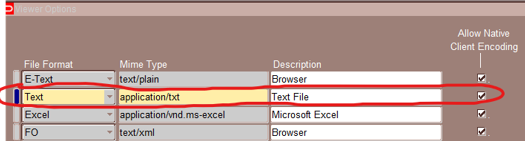
To implement the solution test the following setups::

1.Navigate to System Administrator responsibility

2.Install -- Viewer option

3.Add new entry

   File Format :: Text

   mime type :: application/txt

   Description :: Text File

   Select Allow Native encoding checkbox


4.Using System administrator responsibility Navigate to User -- Profile form

5.Update profile 'Viewer: Application for Text' value to Text File.


7.Logout and re-login to EBS application.

8.Retest the issue.


REFERENCES

Meta link id :- (Doc ID 2786457.1)

ERROR 1396 (HY000): Operation ALTER USER failed for 'Mysql'@'%'

 This MySQL error — ERROR 1396 (HY000): Operation ALTER USER failed for 'Mysql'@'%' — means that MySQL cannot find the user ...